Polycarbonate eID Card
Seven fused layers, a dual-interface chip and twenty security features on front and reverse.
How the IDMETRIX polycarbonate eID card is built: the layers it is laminated from, the printed design before and after personalization, the inks and what they do under UV, IR and NIR light, the antenna inside, and every security feature on both sides — each rated by the level of inspection needed to check it.
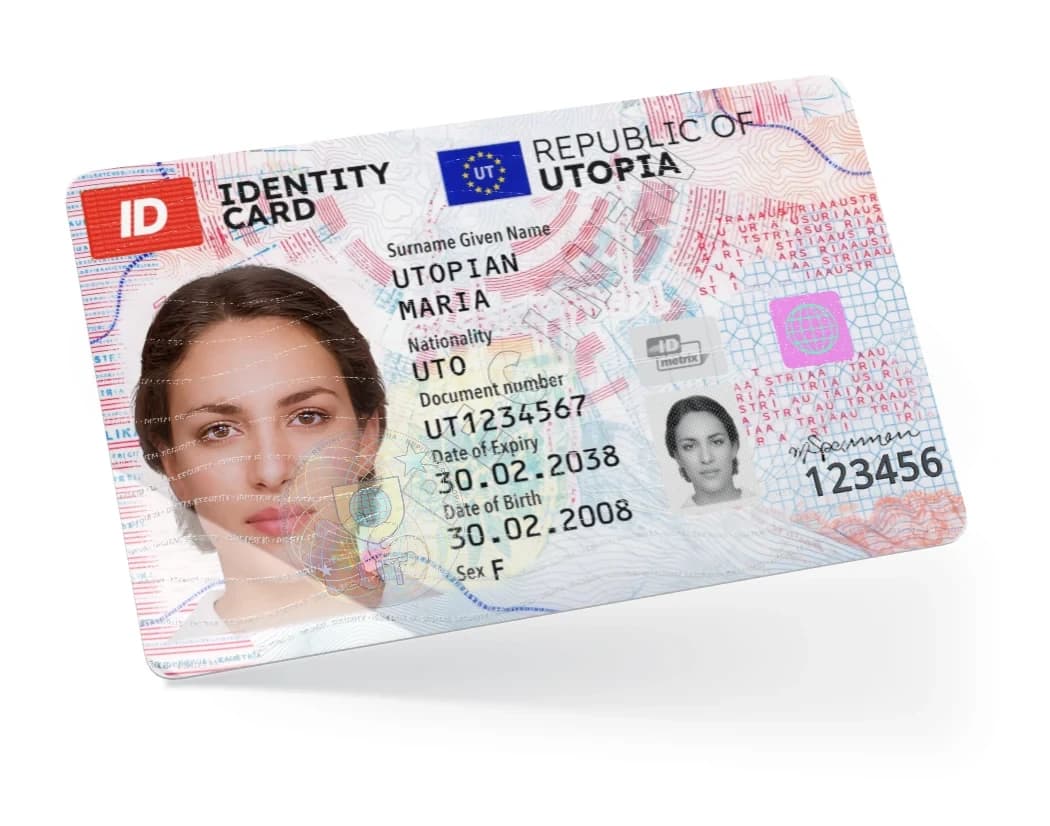
- Format
- ID-1 · 85.60 × 53.98 mm
- Body
- 7-layer polycarbonate, fused
- Chip
- Dual interface — contact & contactless
- Personalization
- Laser engraving, CLI
- Features
- 20 on front and reverse
Seven Layers, One Monolithic Body
Around an opaque white inlay — the antenna core between two white cover sheets — the card is built outwards to both faces: a clear printed sheet, a laser-sensitive sheet and a clear overlay on each side. The printed sheets are transparent — the card only turns opaque once they are laminated onto the white inlay. No adhesive is used: the layers fuse into a single piece that cannot be split without destroying it.
Inlay core with antenna. The centre of the card: a copper-wire antenna and the chip module embedded in PC. The inlay is built as a separate product and fused into one opaque white sheet.
Fused, not glued
Delamination to swap the photo or data tears the printed and engraved layers apart.
Data inside the body
Laser engraving blackens the PC below the surface. It cannot be scratched off or overwritten.
Window in the inlay
The white inlay is cut out at the see-through window, so only clear PC remains there.
One Card, Four Levels of Inspection
Every feature is rated by the level of inspection needed to check it, so a glance at the counter, a simple tool and a lab each have their own checks.
Everyone, no tools
No equipment required to verify authenticity. Look, feel, tilt, hold against the light.
Simple device
A simple device is required — magnifier, UV lamp, IR viewer, NIR pen or document reader.
Forensic lab
Forensic equipment and specialist knowledge are required to verify authenticity.
Manufacturer only
Authenticity can only be verified by the manufacturer, using undisclosed reference data.
The Same Card Under Five Kinds of Light
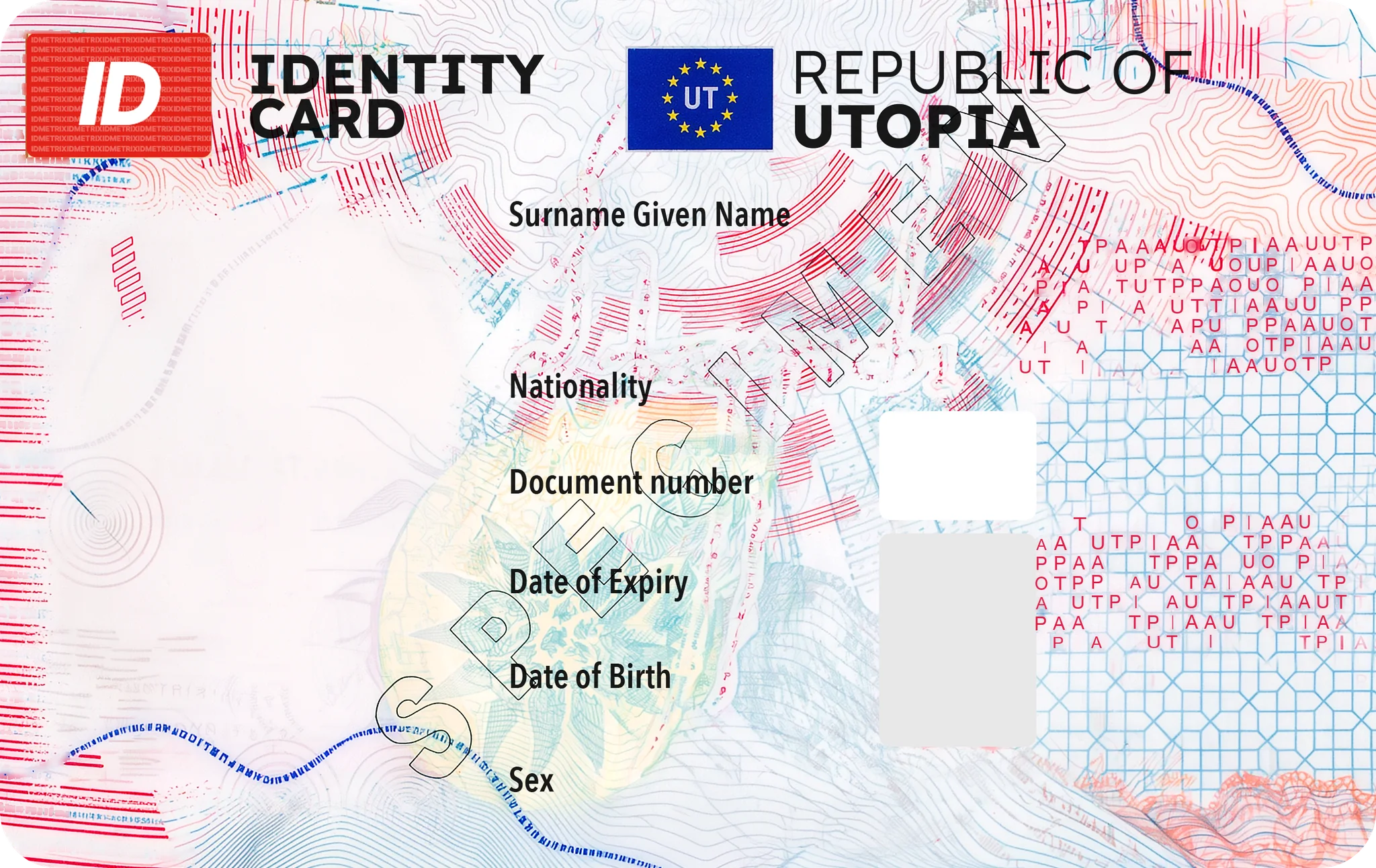
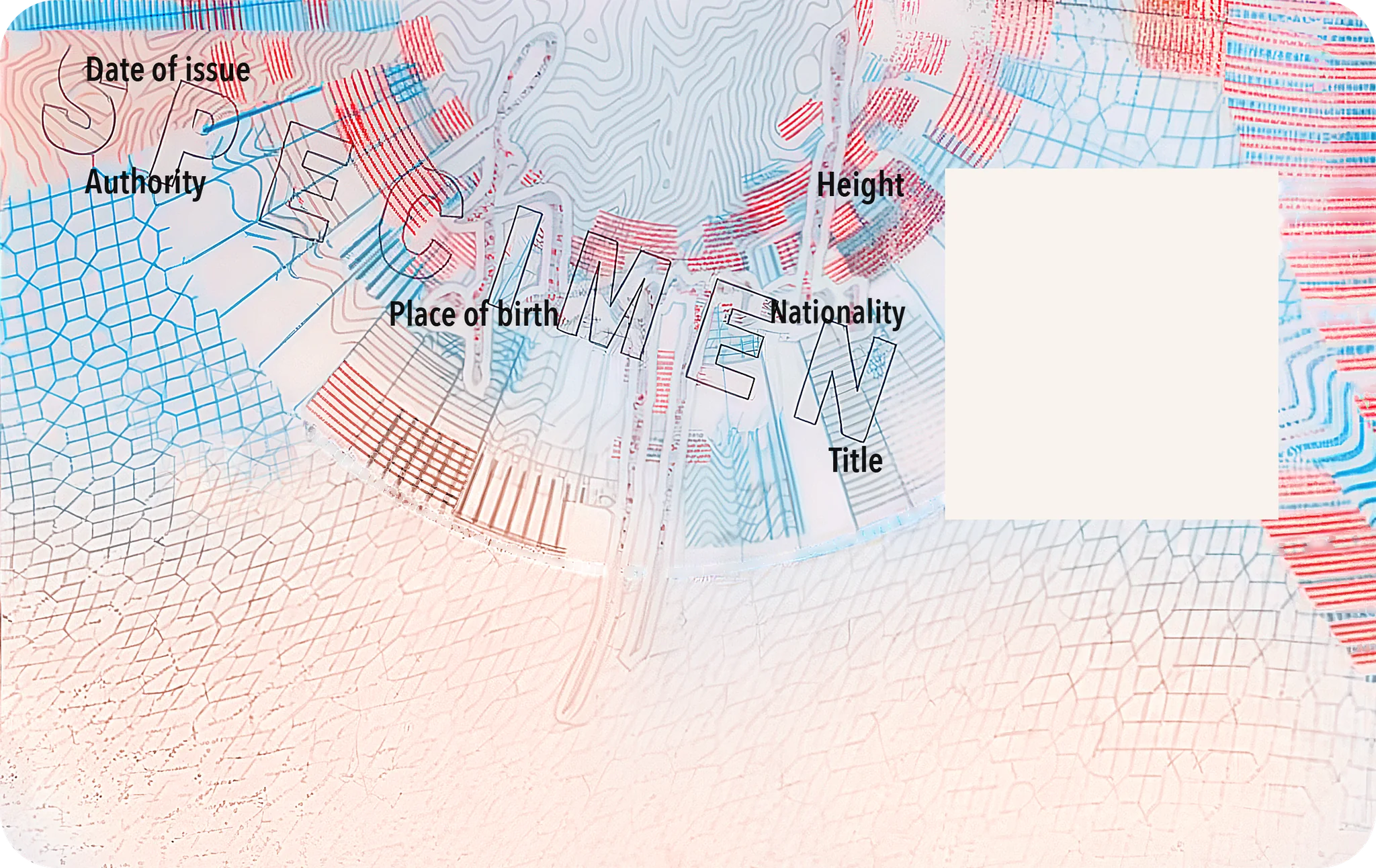
The security printing as it leaves the press, the finished card, and what appears under ultraviolet, infrared and near-infrared light. The card body is made UV-dull, so under a 365 nm lamp only the intended inks light up.
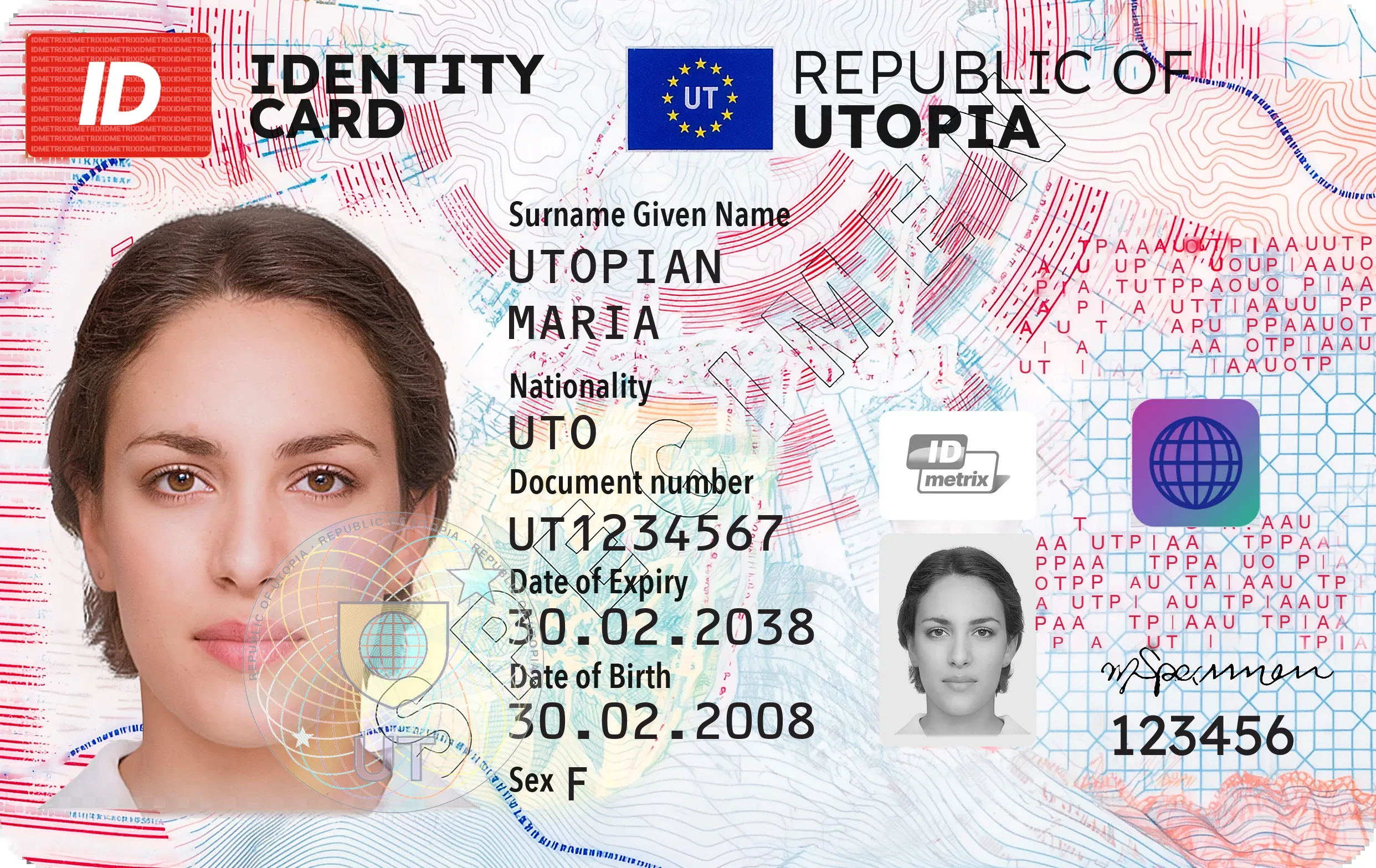
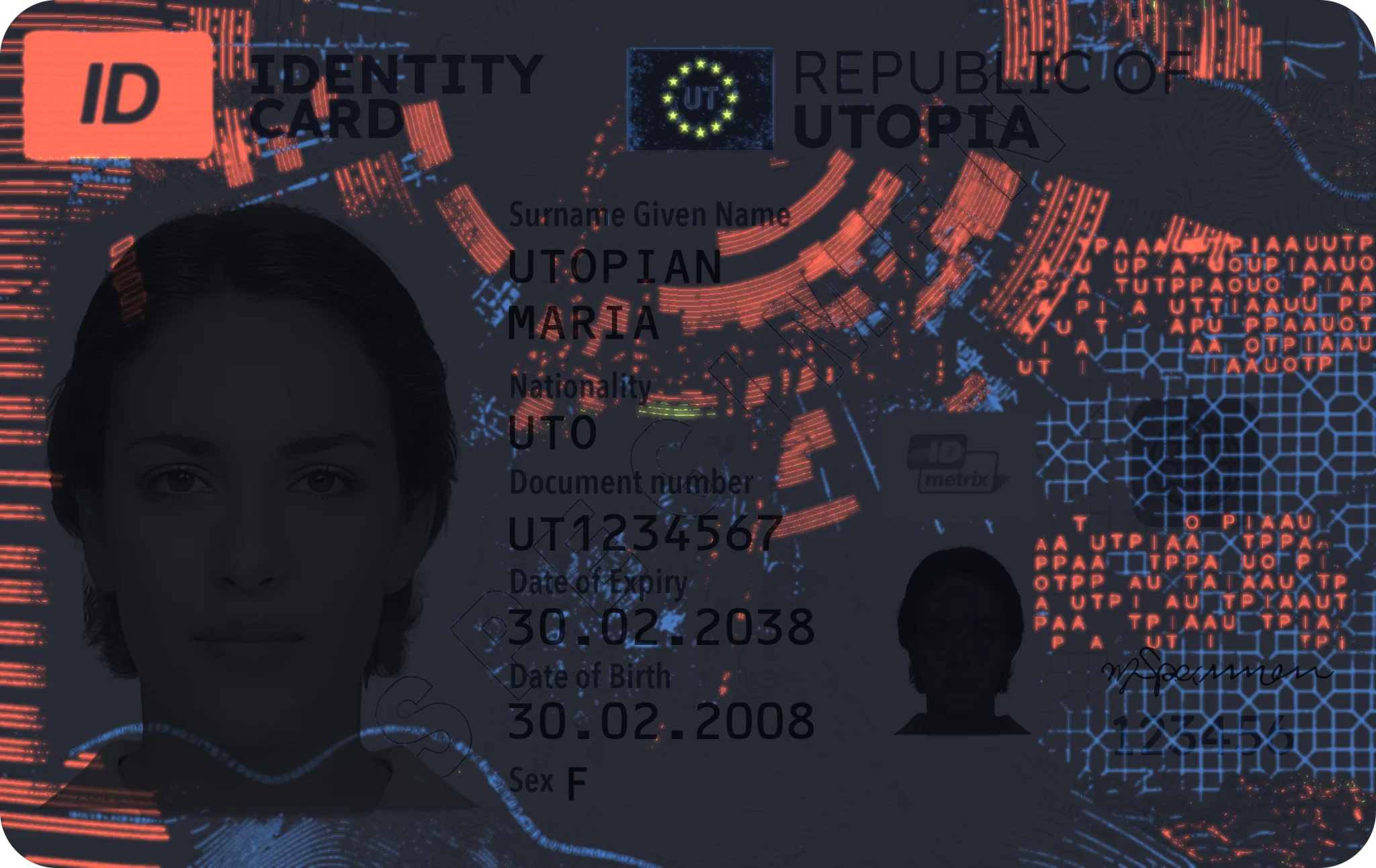
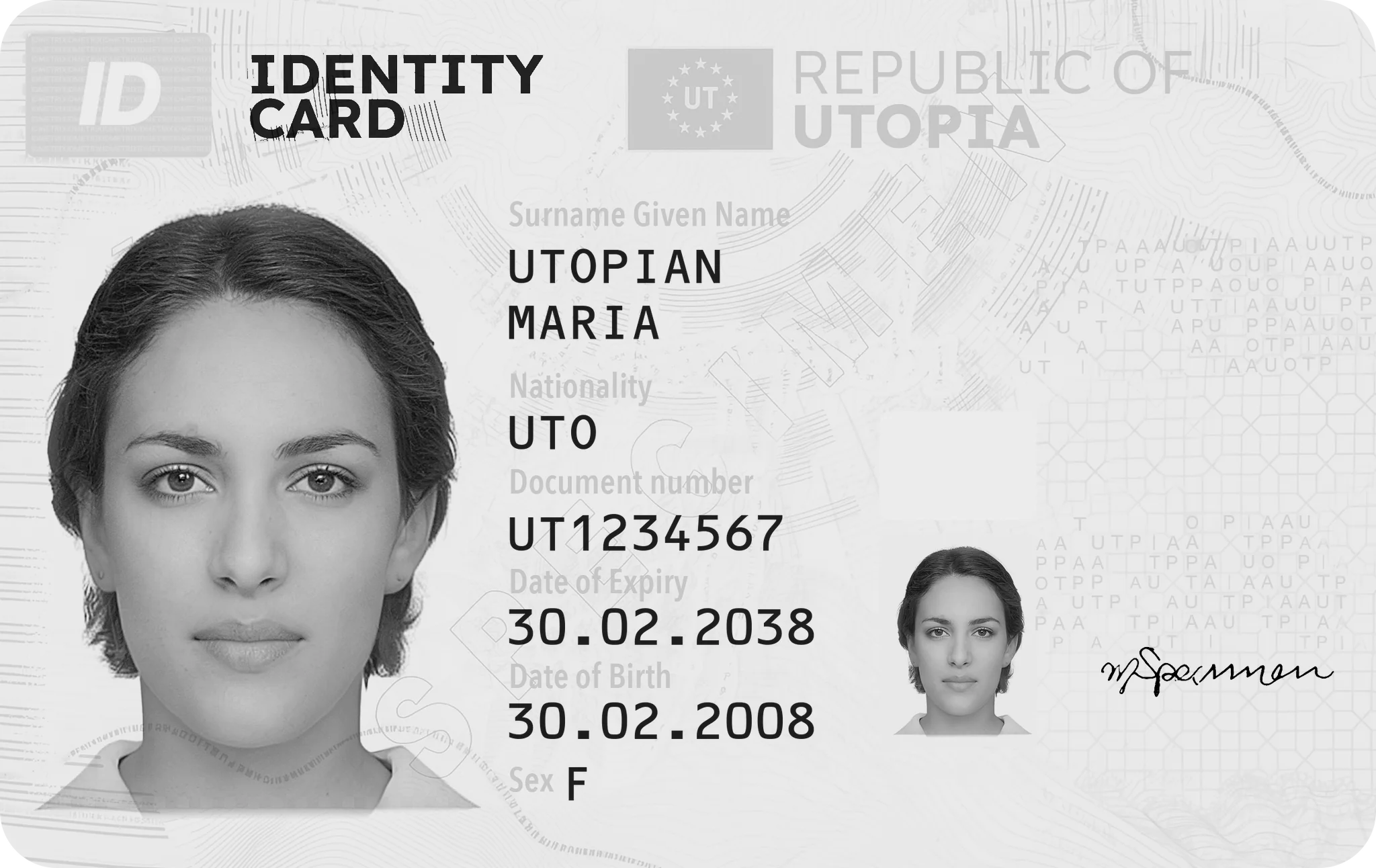
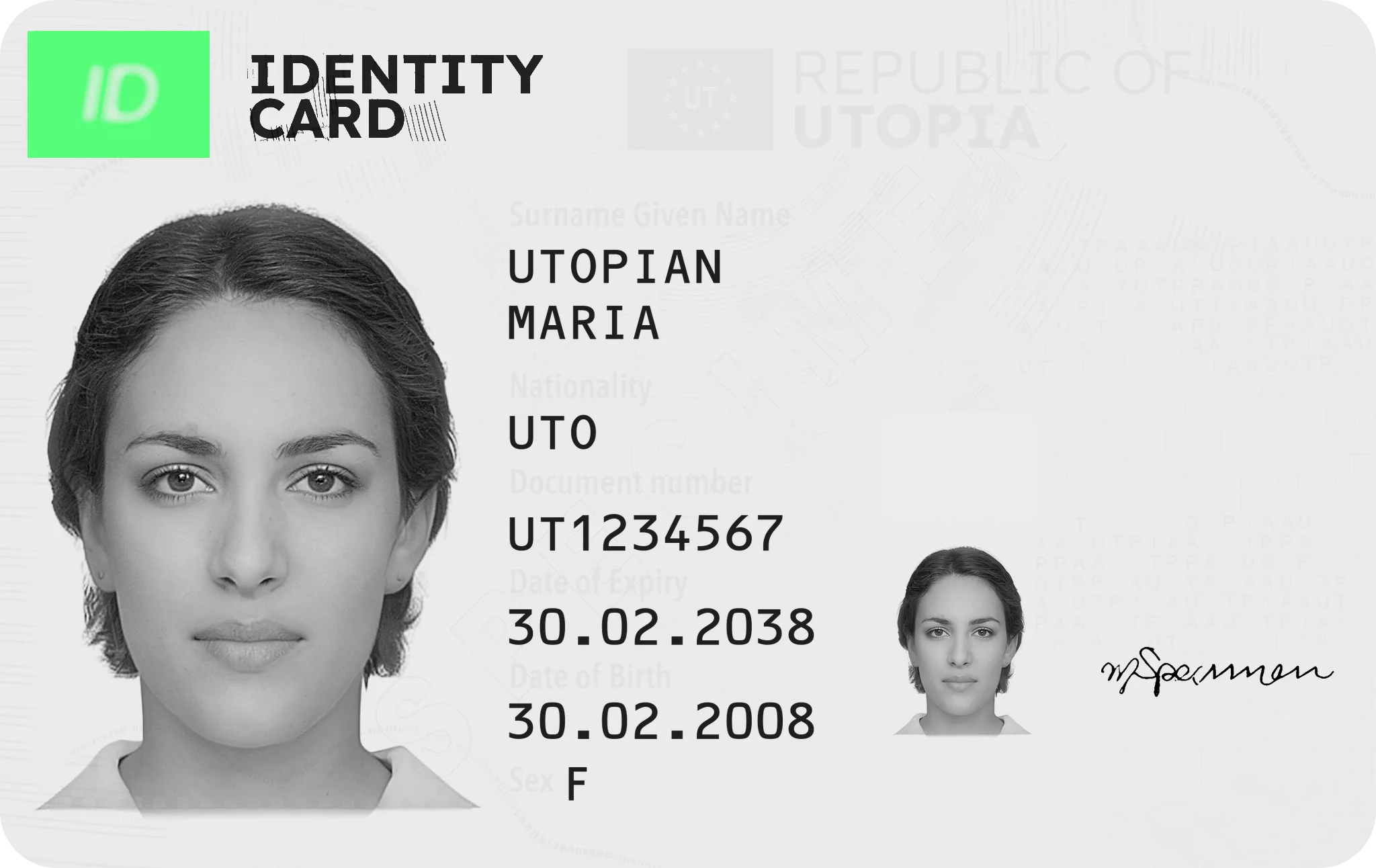
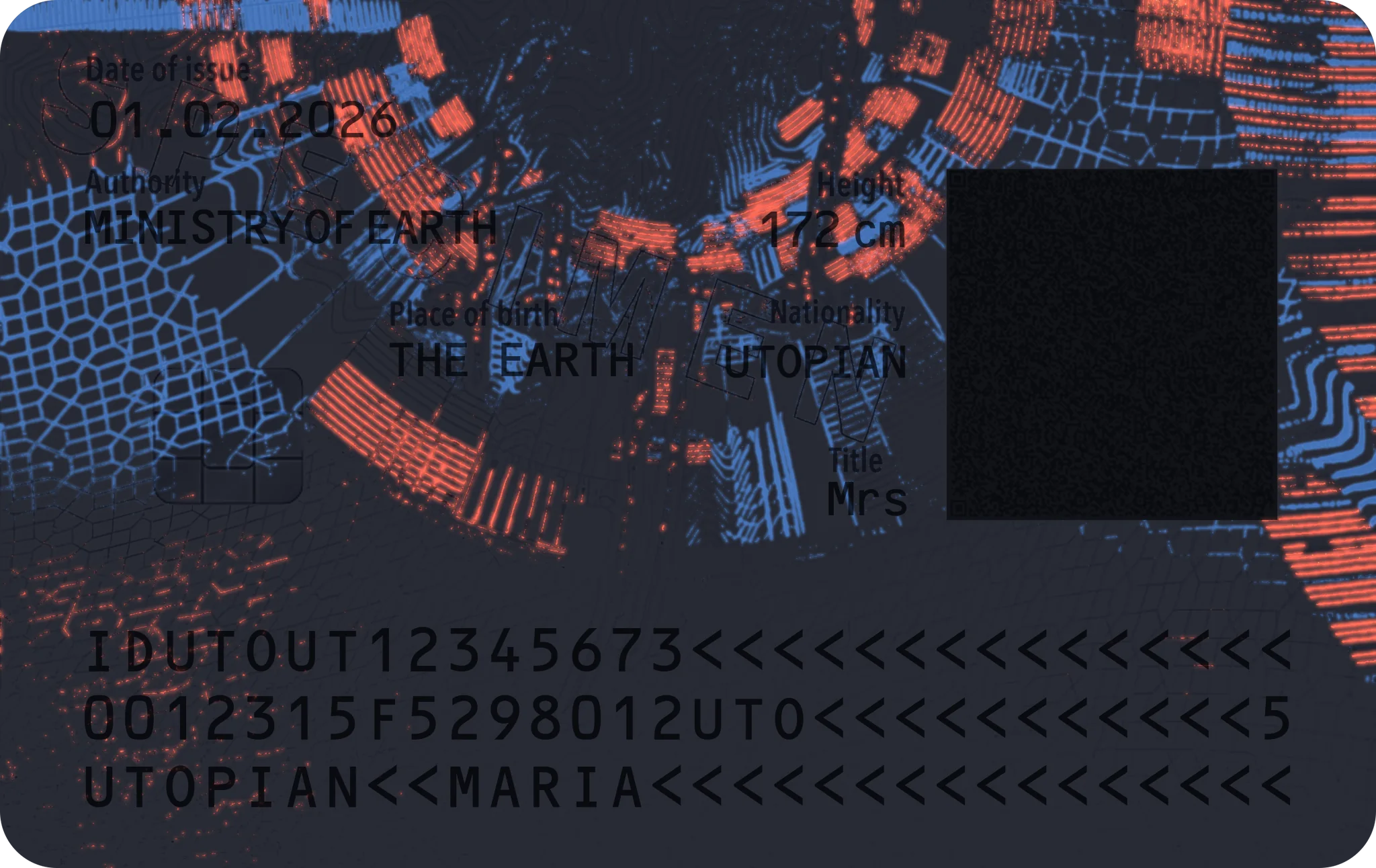
The finished card
Portrait, CLI and personal data engraved into the laser layer, the DOVID inside the card, over the portrait edge.
Relief you can feel
Tactile laser relief
The card number, raised by the laser foaming the polycarbonate under it, so it can be felt. Braille can be added the same way.
Debossed structure
A globe and waves of microtext pressed into the overlay by the laminating rollers or plates.
CLI lens field
Lenticular lenses over the laser image; the relief is the optical element.
One Chip, Two Ways to Talk to It
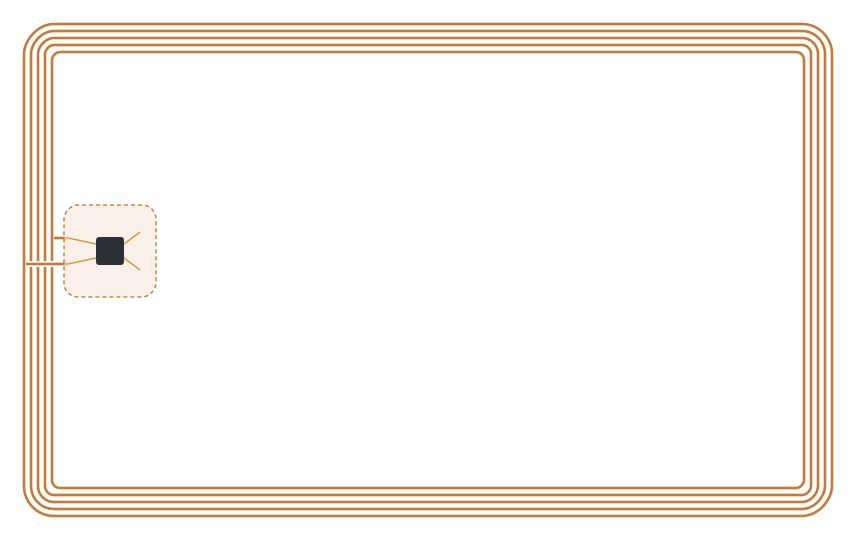
A single secure chip module is wired both to a gold contact plate and to a copper antenna embedded in the inlay. Terminals can read it by contact or wirelessly — the same applications and keys answer on both interfaces.
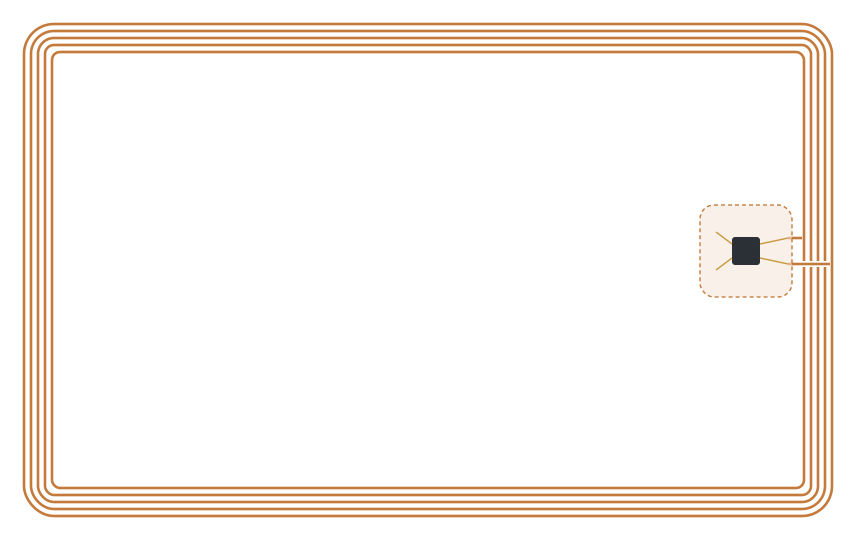
Coil & module under the OVI cover
Five turns of copper wire run around the card edge and end at the chip module, which sits beneath the optically variable emblem on the front.
Contact plate on the reverse
The module’s gold contacts come to the surface on the reverse. Antenna and plate share the same chip, so the card behaves identically in a slot or on a pad.
ISO/IEC 14443 · 13.56 MHz
Border e-gates, mobile readers, smartphones via NFC.
ISO/IEC 7816
Card readers at desks, kiosks and for PIN-based e-signature.
Embedded, not printed
Coil and module are laminated between the cores — invisible, and destroyed by tampering.
Ten Inks on the Front, Six on the Reverse
Each colour is a separate spot ink, not a CMYK mix. Iris inks blend into each other without a dot screen; UV and IR inks add behaviour no office printer can reproduce. The optically variable ink is not among them: it is screen-printed onto the laminated card.
- ABlack
- BIR blackIR
- CPMS 485 · red
- DPMS 192 + UV redUV
- EPMS Reflex Blue
- FPMS 2995 + UV blueUV
- GPMS 7401 + UV yellowUV
- HPMS 1625 · coral
- IIris PMS 196–white–2905IRIS
- JPMS 7543 · blue grey
- ABlack
- DPMS 192 + UV redUV
- FPMS 2995 + UV blueUV
- JPMS 7543 · blue grey
- KIris PMS 7506–white–2905IRIS
- LPMS 7522 · terracotta
Swatches are screen approximations of the spot inks. Inks tagged UV are visible colours with an added UV pigment; they glow under a 365 nm lamp.
Twenty Features on Front and Reverse
Twelve printed and embedded features protect the front and eight the reverse. They are layered so that every level of inspection has its own checks, and no single forgery technique can reproduce them all.
Features 1–12 · Front
Point at a number to find the feature.
- 1
Anti-Stokes feature
NIR laser 980 nmLevel 2A covert up-converting pigment in the red “ID” logo turns invisible near-infrared light into visible green — the reverse of normal fluorescence. Invisible in daylight and under UV.
Why it matters. Up-converting pigments are controlled security materials; a scan, print or copy stays dark under the laser.
- 2
IR drop-out
IR 850–950 nmLevel 2The design is printed in IR-transparent inks, so under infrared almost all colour vanishes. Only the title “IDENTITY CARD” in IR-absorbing black and the laser-engraved data stay dark.
Why it matters. CMYK and inkjet copies react to IR uniformly. Document readers use the IR image for automatic checks.
- 3
Tactile laser relief
Touch · oblique lightLevel 1At personalization the laser foams the polycarbonate under the card number: the material swells and the digits stand up from the face, so they can be felt with a fingertip as well as read. Braille for blind holders can be added the same way.
Why it matters. Relief cannot be printed, and it is formed inside the card body: skimming or relaminating the surface to change the number flattens it.
- 4
Microprinted letter field
Magnifier 8–10×Level 2Rows of red capitals scattered over a grid on the right of the face. Seen from arm’s length they read as a texture; under a loupe they are the letters of UTOPIA, set with irregular gaps.
Why it matters. The fine letters and their spacing blur into shapes in any scan or copy, and are hard to reset by hand.
- 5
Optically variable ink (OVI)
TiltLevel 1The globe emblem is screen-printed onto the laminated card in ink with interference flakes that shift from magenta to green with the viewing angle.
Why it matters. Scanners and printers capture one angle, so a copy shows one static colour. OVI pigment is sold only to security printers.
- 6
Changeable laser image (CLI)
Tilt left–rightLevel 1Laser engraving under lenticular lenses in the card surface: one angle shows the holder’s portrait, the other the year of birth.
Why it matters. Personal data is written inside the card body at personalization. It needs a lenticular card and special laser optics, and cannot be altered without destroying the lenses.
- 7
Guilloches with variable line width
MagnifierLevel 2Contour-like lines that swell and thin, running around the title and the right edge of the face, printed so that colours blend without a dot screen.
Why it matters. Continuous fine lines and seamless colour transitions break into CMYK dots in any reproduction.
- 8
Fluorescent blue ink
UV 365 nmLevel 2The octagon lattice on the right is printed in visible light blue with an added UV pigment that glows bright blue.
Why it matters. The card body is UV-dull, so only intended elements light up. Common plastics and papers glow all over or not at all.
- 9
Positive microtext
Magnifier 8–10×Level 2The dotted blue line that waves across the face is a line of microtext about 0.25 mm high.
Why it matters. Below copier resolution: a reproduction turns it into a dotted or solid line.
- 10
Hot-stamped DOVID
TiltLevel 1A diffractive optically variable image: a transparent holographic foil hot-stamped onto the laser-sensitive PC layer and laminated under the clear overlay, overlapping the portrait.
Why it matters. Its moving, colour-changing effects cannot be printed. Covering the photo edge blocks photo substitution.
- 11
Fluorescent red & yellow inks
UV 365 nmLevel 2The red guilloche arcs and the pale yellow emblem behind the personal data carry UV pigments: under UV the arcs glow red and the emblem yellow-green.
Why it matters. Two UV colours in register with the visible print are hard to match; a single-ink copy cannot reproduce both.
- 12
See-through window
Transmitted lightLevel 1A clear area in the opaque polycarbonate body, fused during lamination, with the logo printed inside it and visible from both sides.
Why it matters. Cannot be imitated on an opaque substrate; splitting the layers destroys it.
Features 13–20 · Reverse
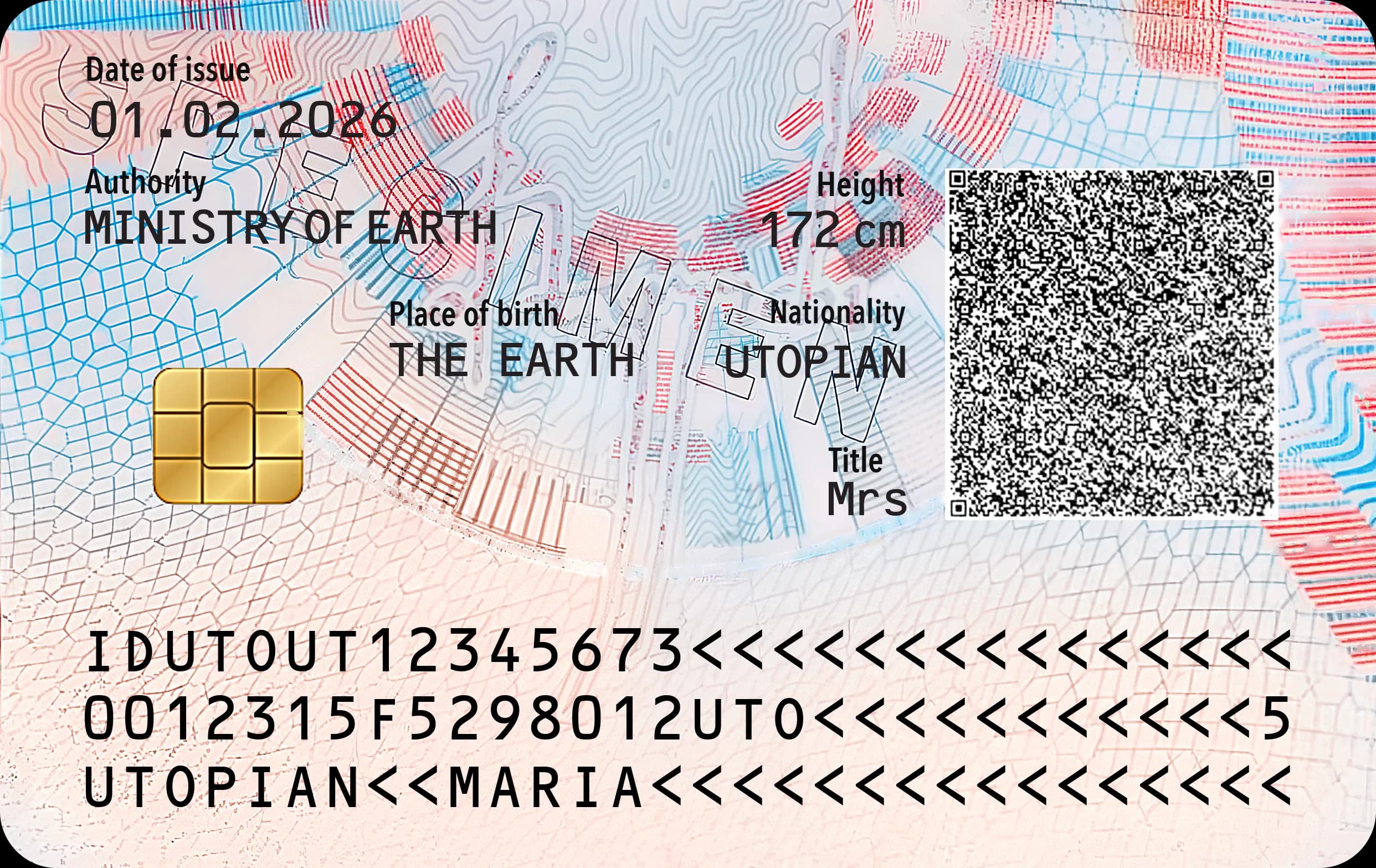
Point at a number to find the feature.
- 13
Fluorescent red ink
UV 365 nmLevel 2The red line bands at the top and right of the reverse glow red under UV.
Why it matters. Only intended elements light up on the UV-dull body; ordinary inks and toners do not fluoresce in controlled colours.
- 14
Radial guilloche fan
MagnifierLevel 1A fan of fine lines radiating from the centre of the reverse, whose width swells and thins in steps.
Why it matters. Seamless line-width modulation breaks into dots in any scan or reprint.
- 15
See-through window
Transmitted lightLevel 1The clear window from the front seen from the reverse — the logo printed inside it shows through, mirrored.
Why it matters. Cannot be imitated on an opaque substrate; splitting the layers destroys it.
- 16
Contour-line pattern
MagnifierLevel 2Fine contour lines, like a relief map, run under the data at the top of the reverse; each line keeps its course without breaks.
Why it matters. Scans break the hair-thin lines into dots and steps; they cannot be rebuilt by hand.
- 17
Machine readable zone (MRZ)
Reader · IRLevel 1–2Three lines of 30 OCR-B characters (ICAO 9303, TD1) with check digits, laser-engraved and readable in IR.
Why it matters. Readers verify check digits and compare the MRZ with the chip and printed data.
- 18
Irregular complex background
MagnifierLevel 1A non-repeating crackle network in iris print fills the lower half of the reverse; no two cells are alike.
Why it matters. It cannot be tiled or rebuilt from a scan; any copy loses line continuity.
- 19
Fluorescent blue cell network
UV 365 nmLevel 2The blue cell network on the left of the reverse is printed with a UV pigment and glows blue under UV.
Why it matters. A second UV colour in its own register; a single-ink copy cannot match both.
- 20
QR code
Smartphone · readerLevel 2Laser-engraved 2D code that can carry a digitally signed extract of the holder data.
Why it matters. Offline check: the signed data must match what is printed and stored in the chip.
Security Features by Level
The full range of features available for IDMETRIX polycarbonate cards, grouped by how they are made. Numbers refer to the features on this specimen; the rest can be added to a national design.
| Printed security features | Level | On specimen |
|---|---|---|
| Guilloches | 1 | 7 · 14 |
| Iris print | 1 | 7 · 18 |
| Microtext | 2 | 4 · 9 |
| UV print (fluorescent inks) | 2 | 8 · 11 · 13 · 19 |
| OVI (optically variable ink) | 1 | 5 |
| IR feature (IR drop-out) | 2 | 2 |
| M-feature (up-converting) | 2 | 1 |
| Latent image (anti-copying) | 1 | Option |
| Micro tags | 3–4 | Option |
| Applied security features | Level | On specimen |
|---|---|---|
| Hologram | 1–3 | 10 |
| Holographic stripe | 1–2 | Option |
| Kinegram & TKO | 1–3 | Option |
| Personalized security features | Level | On specimen |
|---|---|---|
| Laser engraving | 1–3 | portrait · data · 17 · 20 |
| CLI / MLI (individual data) | 1 | 6 |
| Hidden image (IPI) | 2 | Option |
| Laser ink engraving linked to holographic element | 1 | Option |
| MRZ | 1–2 | 17 |
| Ghost image (secondary portrait in the window) | 1 | Option |
| Tactile laser engraving (e.g. CAN, Braille) | 1 | 3 |
| Security features by special processing | Level | On specimen |
|---|---|---|
| Surface relief | 1–2 | 3 |
| CLI / MLI lens | 1 | 6 |
| Transparent border | 1 | Option |
| Card body structure | 3 | Construction |
See the Specimen in Your Hands
Printed and embedded features are best judged under a lamp, not on a screen. We bring the physical card and passport specimens, a UV/IR/NIR inspection kit and the issuing chain behind them — enrolment, personalization and document lifecycle.
Book a Specimen ReviewAll personal data on the specimen is fictitious.